
No more typing reviews! Try our Samantha, our new voice AI agent.
it_user259962 - PeerSpot reviewer
Manager System Security at a comms service provider with 1,001-5,000 employees
Vendor
Jun 23, 2015
The installation of the local hardware scanner appliance is easy, but the asset tagging needs lots of improvements.
Pros and Cons
  • "With QualsyGuard we have been able to achieve this by utilizing its modules, such as vulnerability management, policy compliance, web scanning, malware detection, and asset tagging."
  • "As users of Qualys for the last three years, we have identified and shared many areas where Qualys needed to have improvements, including vulnerability database having some false positives, web scan module requiring authentication to access basic web forms, asset tagging being a complex technique, and for policy compliance they need to add more leading IT standards for leading IT service providers like Juniper, Cisco, and Microsoft."

What is most valuable?

  • Vulnerability management
  • Policy compliance
  • Scalability

How has it helped my organization?

As a leading IT services organization, it is very important for us to have a proactive identification/assessment of vulnerabilities. We also need to be able to remedy them in a timely manner before they exploit our security configuration compliance, and then harden our security for both system/network devices and applications. We need to do this both before and after placing them in production environment.

With QualsyGuard we have been able to achieve this by utilizing its modules, such as vulnerability management, policy compliance, web scanning, malware detection, and asset tagging.

What needs improvement?

As users of Qualys for the last three years, we have identified and shared many areas where Qualys needed to have improvements, including --

  • Vulnerability database having some false positives, although this is rare;
  • Web scan module requires authentication to access basic web forms;
  • Asset tagging needs lots of improvements as it's currently a complex technique; and
  • For policy compliance, they need to add more leading IT standards with regards to all the leading IT service provides like Juniper, Cisco, Microsoft, etc.

For how long have I used the solution?

I've been using this product for the last three years.

Buyer's Guide
Qualys Exposure Management
July 2026
Learn what your peers think about Qualys Exposure Management. Get advice and tips from experienced pros sharing their opinions. Updated: July 2026.
909,563 professionals have used our research since 2012.

What do I think about the stability of the solution?

This is a very stable product and we haven't faced any issues since its deployment apart from announced downtimes for upgrades and improvements.

What do I think about the scalability of the solution?

No issues encountered.

How are customer service and support?

Customer Service:

Support is available 24/7 via phone and e-mail. Remote session support is also available.

Technical Support:

They have excellent expertise.

Which solution did I use previously and why did I switch?

No previous solution was used.

How was the initial setup?

It's easy as it is a SaaS, cloud-based service. The installation of the local hardware scanner appliance is also easy.

What about the implementation team?

We used a vendor team who was excellent.

What was our ROI?

I cannot give you the exact ROI on this, but as a large information and communication technology service provider, a 24/7 service availability that leads to customer satisfaction is our key goal. Regular VM and compliance assessment results in the complete hardening of our critical assets defending us against any exploits that leads to unavailability of our services.

Which other solutions did I evaluate?

No, because it was already in use at our parent company and it was providing good results for a low price as well.

What other advice do I have?

  • Collect complete asset inventory details (asset type, service/application details, administrator details etc.).
  • Provide awareness session to the support team about Qualys, its usage, and functionality.
  • Prepare OLAs and SOPs for better co-ordination between the teams.
Disclosure: My company does not have a business relationship with this vendor other than being a customer.
PeerSpot user
it_user216711 - PeerSpot reviewer
it_user216711Product Manager with 1,001-5,000 employees
Real User

Yes, this review is helpful.

it_user254613 - PeerSpot reviewer
Security Consultant at Cyber Intelligence Sdn Bhd
Consultant
Jun 21, 2015
The reporting features needs to be improved, but you don't need to spend a lot of time on the deployment.
Pros and Cons
  • "Use it. It is a great product."
  • "Maybe the reporting features. It is too granular, so that if someone new wants to get familiar with it, they will have a hard time."

What is most valuable?

The fact that it's on the cloud, so there's no configuration whatsoever on my physical machine except for the VM scanner.

How has it helped my organization?

It now takes less time to run a vulnerability assessment for our client. I do not have to bring two laptops anymore to my clients sites.

What needs improvement?

Maybe the reporting features. It is too granular, so that if someone new wants to get familiar with it, they will have a hard time. A few more tutorials or guide on screen would also be appreciated.

For how long have I used the solution?

I've been using the consultant edition for two years.

What was my experience with deployment of the solution?

During the internal scanner deployment, but the issue was mostly not the product, but more the network architecture of our client.

What do I think about the stability of the solution?

No issues encountered.

What do I think about the scalability of the solution?

No issues encountered.

How are customer service and technical support?

Customer Service:

9/10

Technical Support:

9/10

Which solution did I use previously and why did I switch?

Rapid 7 Nexpose. To use the software, it takes a whole laptop just to run it, and the results have too much redundancy. Additionally, the scan rate is very slow compared to Qualys, and furthermore it is too expensive when compared to Qualys.

How was the initial setup?

It's very straightforward. Basically you can scan anything external/internet facing within five minutes. For internal scans you have to deploy the internal scanner which can be done in five minutes if the network architecture is not too complex.

What about the implementation team?

It was done In-house, but the help we get from their Singapore support team is awesome.

Which other solutions did I evaluate?

  • Nessus
  • Nexpose

What other advice do I have?

Use it. It is a great product. Many people are sceptical that their scan results are in the cloud. But if you want something affordable and that works like a charm, go for Qualys. Less headaches and easy to achieve ROI as you don't spend much on the deployment or maintenance.

Disclosure: PeerSpot contacted the reviewer to collect the review and to validate authenticity. The reviewer was referred by the vendor, but the review is not subject to editing or approval by the vendor. The reviewer's company has a business relationship with this vendor other than being a customer: We have been doing some road-shows, & conferences in Malaysia to introduce Qualys.
PeerSpot user
Buyer's Guide
Qualys Exposure Management
July 2026
Learn what your peers think about Qualys Exposure Management. Get advice and tips from experienced pros sharing their opinions. Updated: July 2026.
909,563 professionals have used our research since 2012.
it_user255882 - PeerSpot reviewer
Customer Technical Leader for Galeries Lafayette at a tech company with 10,001+ employees
Vendor
Jun 17, 2015
The GUI needs work, but the vulnerabilities are kept up to date.
Pros and Cons
  • "The top one for me is that the vulnerabilities are kept up to date."
  • "I’m convinced it could be possible to do a simpler interface."

What is most valuable?

The top one for me is that the vulnerabilities are kept up to date.

How has it helped my organization?

It has reduced the cost of ownership for the engineers who can launch scans on the customers’ networks.

What needs improvement?

I’m convinced it could be possible to do a simpler interface.

For how long have I used the solution?

I used it for about four years.

What was my experience with deployment of the solution?

No issues encountered.

What do I think about the stability of the solution?

There is an issue with the web browser, but it's not an issue with the product itself.

What do I think about the scalability of the solution?

No issues encountered.

How are customer service and technical support?

Customer Service:

9/10.

Technical Support:

8/10.

Which solution did I use previously and why did I switch?

I switched due to the cost.

How was the initial setup?

It was simple because it's only used for external scans.

What's my experience with pricing, setup cost, and licensing?

You have to find the best solution regarding functions and cost.

Which other solutions did I evaluate?

  • Tripwire
  • Nessus
  • Accunetix
  • OIpenvas

What other advice do I have?

  • Take your time
  • Study all the functionalities of the product
  • Try to set it up in a lab first before your production environment.
Disclosure: My company does not have a business relationship with this vendor other than being a customer.
PeerSpot user
it_user254973 - PeerSpot reviewer
Manager Information Security at a healthcare company with 10,001+ employees
Real User
Jun 16, 2015
There are some stability issues with reporting, but it's straightforward to implement.
Pros and Cons
  • "It has helped to automate the vulnerability management program, increasing the security posture and helped us to identify the security risks in our infrastructure."
  • "Web application security model needs some work."

What is most valuable?

Vulnerability management.

How has it helped my organization?

It has helped to automate the vulnerability management program, increasing the security posture and helped us to identify the security risks in our infrastructure.

What needs improvement?

Web application security model needs some work.

For how long have I used the solution?

I've been using it for four years, including including VM, PCI, WAS and MDS features.

What was my experience with deployment of the solution?

No issues encountered.

What do I think about the stability of the solution?

There's been a few times, related to reporting, that we've had issues, but overall it's stable.

How are customer service and technical support?

Customer Service:

Excellent, the Qualys support team always helps on a priority basis.

Technical Support:

Excellent!

Which solution did I use previously and why did I switch?

No previous solution was used.

How was the initial setup?

It was straightforward.

What about the implementation team?

It was done in-house.

Which other solutions did I evaluate?

No other options were looked at.

Disclosure: My company does not have a business relationship with this vendor other than being a customer.
PeerSpot user
it_user254970 - PeerSpot reviewer
Technical Services Manager at a tech company with 10,001+ employees
Vendor
Jun 16, 2015
It is very simple and yet an effective way to do vulnerability assessment.
Pros and Cons
  • "I would definitely recommmend using this product, as this is very simple and yet an effective way to do vulnerability assessment."
  • "The support needs to improve a lot, their response is absolutely slow."

What is most valuable?

  • Vulnerability assessment
  • Asset management
  • WAS

How has it helped my organization?

Since this is a SaaS based solution, the vulnerability scan with the external scanners as well as the reporting has improved a lot. The reporting is very granular and you can please higher management with your reports.

What needs improvement?

None, as the product is great.

For how long have I used the solution?

I've used it for four years.

What do I think about the stability of the solution?

Stability of the product is very high, I have never seen it unavailable.

How are customer service and technical support?

Customer Service:

The support needs to improve a lot, their response is absolutely slow. I have had terrible experience with support over the years.

Technical Support:

I would rate it great because of its improvement since I have had terrible experiences in the past.

Which solution did I use previously and why did I switch?

We used McAfee Vulnerability Manager/Foundstone and had to switch because this is a SaaS based solution and has more features/capabilities.

How was the initial setup?

The initial setup is very simple in terms of configuring the appliance.

What about the implementation team?

We installed it ourselves,

What other advice do I have?

I would definitely recommmend using this product, as this is very simple and yet an effective way to do vulnerability assessment.

.

Disclosure: My company does not have a business relationship with this vendor other than being a customer.
PeerSpot user
it_user254967 - PeerSpot reviewer
Linux Administrator at a comms service provider with 501-1,000 employees
Vendor
Jun 16, 2015
The users on the forums are very knowledgeable, but the reporting in the solution is lacking.
Pros and Cons
  • "Vulnerability scans are easily managed and maintained using Qualys."
  • "The reporting is lacking a little, and it would be nice to have reports sent via email."

What is most valuable?

The reporting and vulnerability analysis features.

How has it helped my organization?

Vulnerability scans are easily managed and maintained using Qualys. What used to be a manual process is now automatic. When we have an issue, I can easily see what production systems are affected and I can easily pinpoint a solution to mitigate the issue.

What needs improvement?

The reporting is lacking a little, and it would be nice to have reports sent via email. Often times we have to manually generate the reports after a vulnerability is fixed and a scan has to be re-run.

For how long have I used the solution?

I've used it for three years.

What was my experience with deployment of the solution?

We did not.

What do I think about the stability of the solution?

Our Qualys box is hardware and it's very easy to set up and maintain. It's very little maintenance, and the most time consuming part is setting up everything initially, such as what subnets you want to scan, what reports you want to run, etc.

What do I think about the scalability of the solution?

We have over 15,000 devices and had no issues with scaling up our Qualys infrastructure.

How are customer service and technical support?

Customer Service:

I have never had to interact with them. I get most of the information on the forums, and even there the responses are lighting fast. As far as actually talking to someone, I personally have never had to speak to Qualys support.

Technical Support:

It's great. The users on the forums are very knowledgeable and eager to help. If I need a quick answer I will always get one from the support forum.

Which solution did I use previously and why did I switch?

We used Nessus before. It was a manual process and very time consuming. I like Nessus, but it was very tedious to get it to function automatically.

How was the initial setup?

There are always complexities to every setup. I think the biggest issue was the learning curve. Having to learn all the new pieces and how they fit into our environment was probably the single biggest hurdle we had to face.

What about the implementation team?

We did it in-house.

Which other solutions did I evaluate?

We looked at Metasploit Expose but the price was too much for what we needed.

What other advice do I have?

Do your research and see how this product would best fit into your environment.

Disclosure: My company does not have a business relationship with this vendor other than being a customer.
PeerSpot user
it_user251121 - PeerSpot reviewer
Senior IT Security Analyst at a tech services company with 501-1,000 employees
Consultant
Jun 8, 2015
The IT infrastructure needs work but WAF has improved our vulnerability identification.
Pros and Cons
  • "We can now perform vulnerability scans with WAF integration, and the WAF has improved the vulnerability identification and reports to the SOC and CSO."
  • "The IT infrastructure, especially server administration, needs to be improved."

What is most valuable?

WAF integration is valuable.

How has it helped my organization?

We can now perform vulnerability scans with WAF integration. The WAF has improved the vulnerability identification and reports to the SOC and CSO.

What needs improvement?

The IT infrastructure, especially server administration, needs to be improved.

For how long have I used the solution?

I've used it for two years.

What was my experience with deployment of the solution?

There was only one related, and that need work on our technology. As the solution is cloud based, we needed to adapt our internal policies.

What do I think about the stability of the solution?

There were no issues.

What do I think about the scalability of the solution?

This been done without a problem.

How are customer service and technical support?

Customer Service:

It's good.

Technical Support:

It's good.

Which solution did I use previously and why did I switch?

There was no previous solution, but I did execute several POCs.

How was the initial setup?

It was a regular setup for the configuration, but the official training was necessary.

What's my experience with pricing, setup cost, and licensing?

We also looked at Nessus and GFI Languard.

Disclosure: My company does not have a business relationship with this vendor other than being a customer.
PeerSpot user
it_user247242 - PeerSpot reviewer
Consultant with 501-1,000 employees
Vendor
May 31, 2015
Using the vulnerability management module you can track the list of vulnerabilities.
Pros and Cons
  • "Using the vulnerability management module you can track the list of vulnerabilities and can take action to remediate them."
  • "I can't say as I have worked mostly on its vulnerability management module."

What is most valuable?

I have mostly used vulnerability management so I would recommend it for the same.

How has it helped my organization?

Most of my clients uses it for the vulnerability scanning of their internal & external network devices. Using the vulnerability management module you can track the list of vulnerabilities and can take action to remediate them. You can also see the list of vulnerability by severities and various other stuff.

What needs improvement?

I can't say as I have worked mostly on its vulnerability management module.

For how long have I used the solution?

I've used it for two years.

What was my experience with deployment of the solution?

I didn't work on the deployment.

What do I think about the stability of the solution?

No issues encountered.

What do I think about the scalability of the solution?

No issues encountered.

Which solution did I use previously and why did I switch?

I didn't use a previous solution, but the vulnerability management helped me to find out about it.

Which other solutions did I evaluate?

I have seen other products like Nessus, Nmap, iDefense and so on but I found this one much better.

Disclosure: My company does not have a business relationship with this vendor other than being a customer.
PeerSpot user
it_user5130 - PeerSpot reviewer
Security Expert at a financial services firm with 1,001-5,000 employees
Vendor
Feb 26, 2015
Makes many promises but in order to do so, Qualys requires the client to provide a backdoor to the system.

The QualysGuard Private Cloud Platform (QG PCP) makes many promises, one of which is that vulnerability scan data can be hosted by a private cloud platform in a client's data center and under the client's control. If taken at their word, this may seen promising, but the reality is that Qualys still will have to manage this platform remotely. By doing so, they will have access to this data remotely anyway and can pull it down to their site as needed. Needless to say, Qualys requires the client to provide a backdoor to the system.

The Qualys PCP equipment is leased and never sold to the customer. There are many legal issues with this which allows them to access their equipment. They require the customer to give them remote access in order for them to manage it remotely. That is a requirement and not an option. They keep it a big secret how it is managed.

Remote Access

What kind of remote access to the QG PCP do they require?

1. Persistent iVPN tunnel
2. VPN remote access account
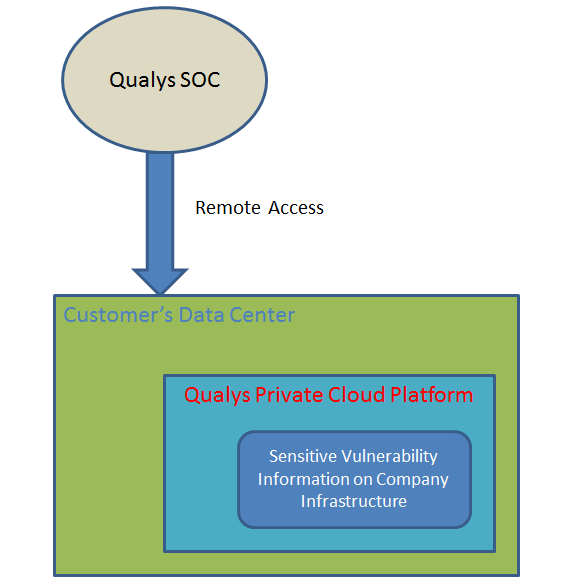

Qualys still has the means to pull the data back to Qualys through SSH/SCP even though it is hosted on a customer site. In fact, Qualys does not allow the customer to monitor the network traffic being sent back to Qualys. Such requests were flat out refused during a security assessment. What they pull back is their business and the customer has no right to know.

Network Sniffer

Network monitoring had to be done outside of the QG PCP as Qualys did not allow internal network sniffing. This traffic analysis did show a few weaknesses.

1. Emails were being sent to email server UNENCRYPTED. Yes, one could see the message being sent as well as who the recipients were. Emails were being back to Qualys through the Internet. A lot of sensitive information were sent unencrypted including server names, configuration, scripts, running jobs, listening ports, full internal DNS names.

2. Internet connections from Indonesia were seen accessing the QG PCP even though it was supposed to be in a controlled access network in a data center


3. A lot of failed DNS requests to www.qualys.com and other qualys subdomains, looks like the system has not been fined tuned to be hosted at a client site. The interesting thing is that it tries to do windows updates on its own by accessing the Internet.
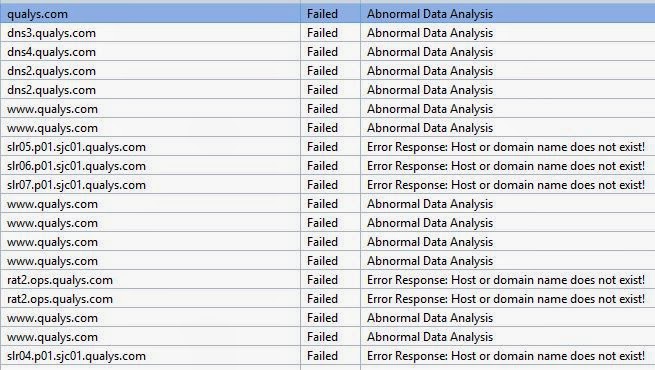
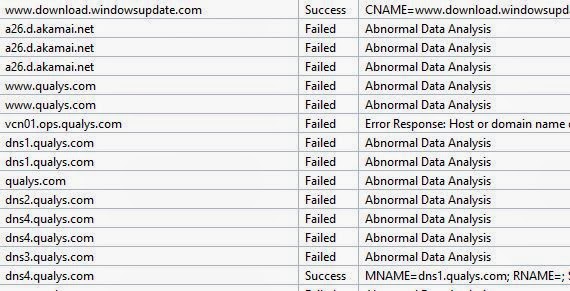
4. Undocumented protocols used by the Qualys PCP; namely AppleTalk, CMIP-Man, and Feixin
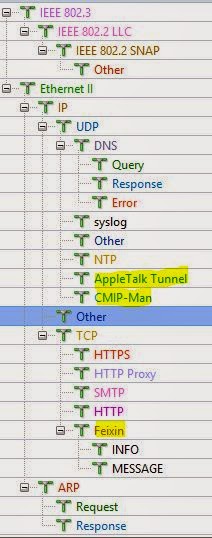

5. syslog messages sent across the network unencrypted.

Firewall Rule Analysis

Firewall rule analysis shows that SSH is allowed into the platform through VPN firewall as well as HTTP(S) protocols.

Internet Access

The Qualys PCP itself does access network traffic in and out of the controlled access network environment as seen in the diagram below.

1. The Qualys PCP Service Network requires outbound communication for

a. NTP – Time Synchronization

b. DNS – Name Resolution

c. SMTP – Email

d. WHOIS – External Internet

e. Daily Vulnerability Updates - External Internet.
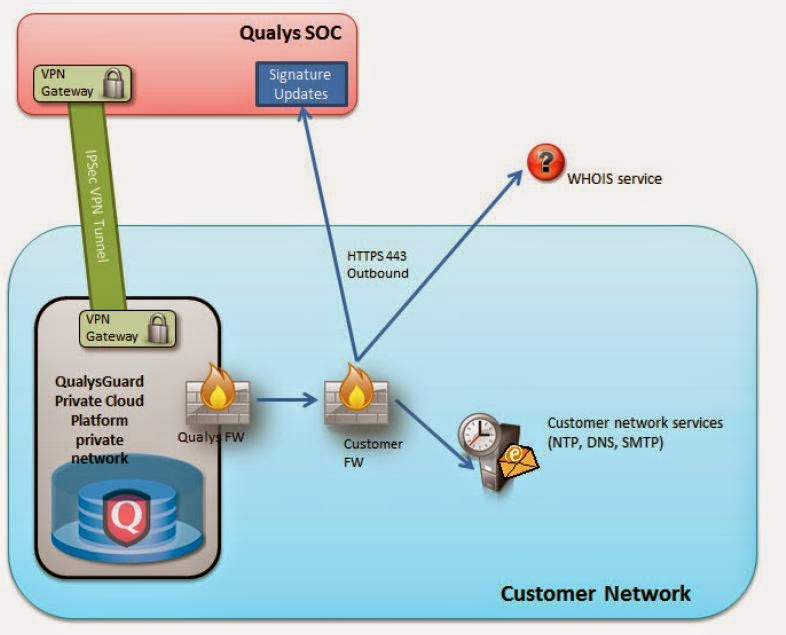
WHOIS pulls information from the Internet and Daily Signature Updates are pulled from Qualys through the Internet on port 443. In effect, the PCP is pulling information from Qualys through the Internet to retrieve updates. A man-in-the-middle attack could intercept the update and instead return a malware update to the Qualys PCP provided that a vulnerability exists in the platform.

2. The physical scanners communicate to the Qualys PCP. This requires that inbound port 443 be opened on the PCP. Physical scanners in the DMZ also need to communicate to the PCP on port 443. Access to the PCP from the DMZ increases the risk.

3. Qualys SOC accesses the PCP through iVPN and VPN connections from the Internet for maintenance and support.

Virtual Scanners

A sniffer placed on a virtual scanner showed that it chose to use SSLv3, which is deprecated, by default on some servers to communicate to the Qualys PCP. In particular, it uses SSLv3 with RC4-MD5. MD5 is obsolete. Qualys documentation claims they use TLSv1 and the latest modern secure protocols.

Application Analysis

Perl API

Application analysis was done by running Perl scripts against the qualysapi server and testing for vulnerabilities. The server itself was found to be vulnerable by accepting login credentials for API requests via base64 encoding and passed through plaintext HTTP. This could result of loss and capture of Qualys Admin credentials which could result in access to vulnerability scan results.


Web Application
The Qualys Web Application tests resulted in a number of vulnerabilities.

Qualys PCP Internal

Additional vulnerabilities were found inside the Qualys PCP infrastructure itself. It was found to be very insecure.

Disclosure: My company does not have a business relationship with this vendor other than being a customer.
PeerSpot user
it_user147540 - PeerSpot reviewer
Security Compliance Analyst at a healthcare company with 501-1,000 employees
Vendor
Aug 20, 2014
Delivers higher frequency of scans & better aggregation of results. Ticket management has room for improvement.
Pros and Cons
  • "Once you are set up properly and have proper acceptance from support teams, device owners and senior management you can start to scan your environment much more often which increases your organizations ability to detect vulnerabilities more often reducing your overall vulnerability footprint and corresponding business risk."
  • "Ticket management"

Valuable Features

Integrity of scanners; never do I need to worry….“Is this scanner going to bring down a host?”.

Improvements to My Organization

Higher frequency of scans, better aggregation of scan results, abundance of different reports (can be scheduled and automated), delivering metrics to senior management.

Room for Improvement

Ticket management

Use of Solution

5 + years

Deployment Issues

No

Stability Issues

No

Scalability Issues

No

Customer Service and Technical Support

Customer Service: Good – 4 out of 5Technical Support: Good – 4 out of 5

Initial Setup

Straightforward. Assuming you know your network layout, # of devices and other basic information it is pretty simple to figure out what you need. Qualys ships you the scanners, you rack them, set them up and technically could start scanning. Though, there is other recommended tasks to complete via the QualysGuard Vulnerability Management web portal such as defining asset groups, setting up scan rules, turning ticketing on, generating reports, etc.

Implementation Team

In-house

ROI

I do not have a specific quantitative number to provide but from a qualitative perspective it has been enormous. Once you are set up properly and have proper acceptance from support teams, device owners and senior management you can start to scan your environment much more often which increases your organizations ability to detect vulnerabilities more often reducing your overall vulnerability footprint and corresponding business risk.

Pricing, Setup Cost and Licensing

The original setup cost was about $10,000 and the day-to-day costs is less than $100 per day with one caveat. Our parent company is large and has allowed us to fall under their pricing model. If we were not under their model our costs would be about 40% higher.

Other Solutions Considered

No, we had a 3rd party running the scans for us. We were very happy with Qualys but wanted to bring it “in-house”. We brought it in-house 5 years ago and never looked back.

Other Advice

Take the time to properly identify your network and as importantly get approval and acceptance from the group up – especially senior management. In addition, it is very important to have your scan schedule, profiles, reporting, metrics, expectations, etc. documented so that everyone in the company understands your expectations.
Disclosure: My company does not have a business relationship with this vendor other than being a customer.
PeerSpot user
Buyer's Guide
Download our free Qualys Exposure Management Report and get advice and tips from experienced pros sharing their opinions.
Updated: July 2026
Buyer's Guide
Download our free Qualys Exposure Management Report and get advice and tips from experienced pros sharing their opinions.