


- Can ingest data from various data sources.
- Is very useful for organizations who are attempting to meet compliance requirements.
- Is able to fully configure and integrate various solutions into one tool and provide actionable results.


My use of Splunk at my previous place of employment improved how we functioned.
I have used Splunk for three years.
We didn’t have any stability issues.

We didn’t have any scalability issues.
During our use of Splunk, we had professional services assisting and not actual technical support. However, the professional services team was great.
Our organization did not have an established SIEM tool.
The initial setup is straightforward, depending on the level of implementation of the tool.
Take into consideration the labor costs for a dedicated Splunk developer who can craft the required queries needed for each organization. Organizations usually have their own form of implementation of each tool.
We didn’t evaluate any alternatives.
SIEM posts have grown in number at Infosecnirvana, but the requests to write about more products keep coming in. One of the oft asked about product is Splunk Enterprise. We have posted on HP ArcSight, IBM QRadar and McAfee Nitro SIEM. However, readers have been asking us repeatedly to write on Splunk.
So here it is finally after being in the works for a long time.
Introduction:
In 2003, One of the most interesting products rolled out and vowed to simplify Log management once and for all (and it did!!!) - Splunk. Their motto was simple – Throw logs at me and I will provide a web based console to search through it intuitively. Interestingly they are one of the few companies that have not been acquired, in spite of being a very innovative product. So let’s see what makes Splunk tick.
Architecture:
As always, a product is as good as its architecture. It has to be solid both internally as well as externally (meaning solution deployment, integration, ease of use, compatibility etc.).
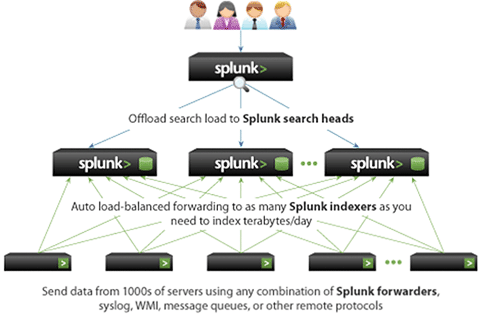
As you can see, there are three distinct components of this architecture and they are as follows:
What’s good about Splunk?
What’s bad?
Conclusion: In our opinion, Splunk is one of the most innovative log management tools out there. But as a SIEM, to use in day to day security management, monitoring, ticketing etc. it has a lot of catching up to do. The ideal scenario will be to use Splunk in the log management layer and use any market leading SIEM in the correlation, workflow and operational management layer. We have seen several successful implementations where Splunk serves as the log management tool and ArcSight or QRadar serves as the Correlation engine. Best of both worlds!!!
















Splunk's schema-on-read technology is one of the most valuable characteristics of this solution. It allows us to store raw data and use it repeatedly for different domains. You don't need to prepare the data upfront.